ROS 2 Vision Suite
YOLO (2D) + MMDetection3D (3D LiDAR) + Core ROS 2 Demos
All running inside a single GPU-accelerated container
This document explains how to build and run the three major ROS 2 perception packages included in this workspace:
| Package | Description |
|---|---|
| mmdetect_lidar_demo | Real-time 3D LiDAR detection using MMDetection3D (PointPillars, SECOND, CenterPoint, etc.) |
| image_demo | YOLOv8 2D detection pipeline over images/video |
| ros2demo | Basic ROS 2 publisher/subscriber example |
All packages are tested inside the container:
ambarishgk007/ros2-vision-suite:cu118 (ROS 2 Humble + PyTorch 2.1.2 + MMCV 2.1.0 + MMDetection3D 1.4.0 + YOLOv8).
1. Running the Container
1.0 Docker pull
docker pull ambarishgk007/ros2-vision-suite:cu118
1.1 Linux (with GUI support)
xhost +local:root

docker run --name ros2-mmdetect-test \
  --gpus all \
  --network host \
  --shm-size=8g \
  -e DISPLAY=$DISPLAY \
  -v /tmp/.X11-unix:/tmp/.X11-unix:rw \
  -w /workspace/ROS2-Tutorial \
  -it ambarishgk007/ros2-vision-suite:cu118 bash
Inside the container:
source /opt/ros/humble/setup.bash
2. Building the ROS 2 Workspace
cd /workspace/ROS2-Tutorial

source /opt/ros/humble/setup.bash
colcon build --packages-select \
  ros2demo \
  image_demo \
  mmdetect_lidar_demo

source install/setup.bash
Verify:
ros2 pkg list | grep -E "ros2demo|image_demo|mmdetect_lidar_demo"
3. LiDAR Detection Demo (mmdetect_lidar_demo)
What the node does
- Subscribes to
/velodyne_points - Converts to NumPy
- Runs MMDetection3D inference
- Publishes:
/bounding_box_edges→Marker/lidar_bounding_boxes→MarkerArray
3.1 Start LiDAR rosbag
docker exec -it ros2-mmdetect-test bash
source /opt/ros/humble/setup.bash
cd ~/Desktop/thesi/ROS2-Tutorial
pip install gdown
# Start clean
rm -rf multilidarcalib12
mkdir multilidarcalib12
cd multilidarcalib12

# metadata.yaml
wget "https://drive.google.com/uc?export=download&id=11MwxBbos8EQRUS6XjXPbnRBSrOqXhUC6" \
     -O metadata.yaml

# bag file: mutlilidarcalib12_0.db3.zstd (≈480 MB)
gdown --fuzzy "https://drive.google.com/file/d/1qeVQGDzyb72oqKI1ZYWFKiv5jW-6iQdG/view" \
      -O mutlilidarcalib12_0.db3.zstd

cd ..
cd ~/Desktop/thesi/ROS2-Tutorial

# Start clean
rm -rf multilidarcalib13
mkdir multilidarcalib13
cd multilidarcalib13

# metadata.yaml
wget "https://drive.google.com/uc?export=download&id=1GTPLLlX4QLvC1_7FCHnvYmRNH1YUuhHt" \
     -O metadata.yaml

# bag file: NOTE the spelling "mutli..." to match metadata.yaml
gdown --fuzzy "https://drive.google.com/file/d/1q4szohuHOTi6MAvWRQXlXD-00gCYgvAK/view" \
      -O mutlilidarcalib13_0.db3.zstd

cd ..
Repo Structure
ROS2-Tutorial/
  multilidarcalib12/
    metadata.yaml
    mutlilidarcalib12_0.db3.zstd

  multilidarcalib13/
    metadata.yaml
    mutlilidarcalib13_0.db3.zstd
cd ~/Desktop/thesi/ROS2-Tutorial

ros2 bag info multilidarcalib12
ros2 bag play multilidarcalib12
# OR run the other
ros2 bag info multilidarcalib13
ros2 bag play multilidarcalib13
ros2 topic list | grep velodyne
ros2 topic echo /velodyne_points
3.2 Run LiDAR detector
source install/setup.bash
ros2 run mmdetect_lidar_demo mmdetect_lidar_demo
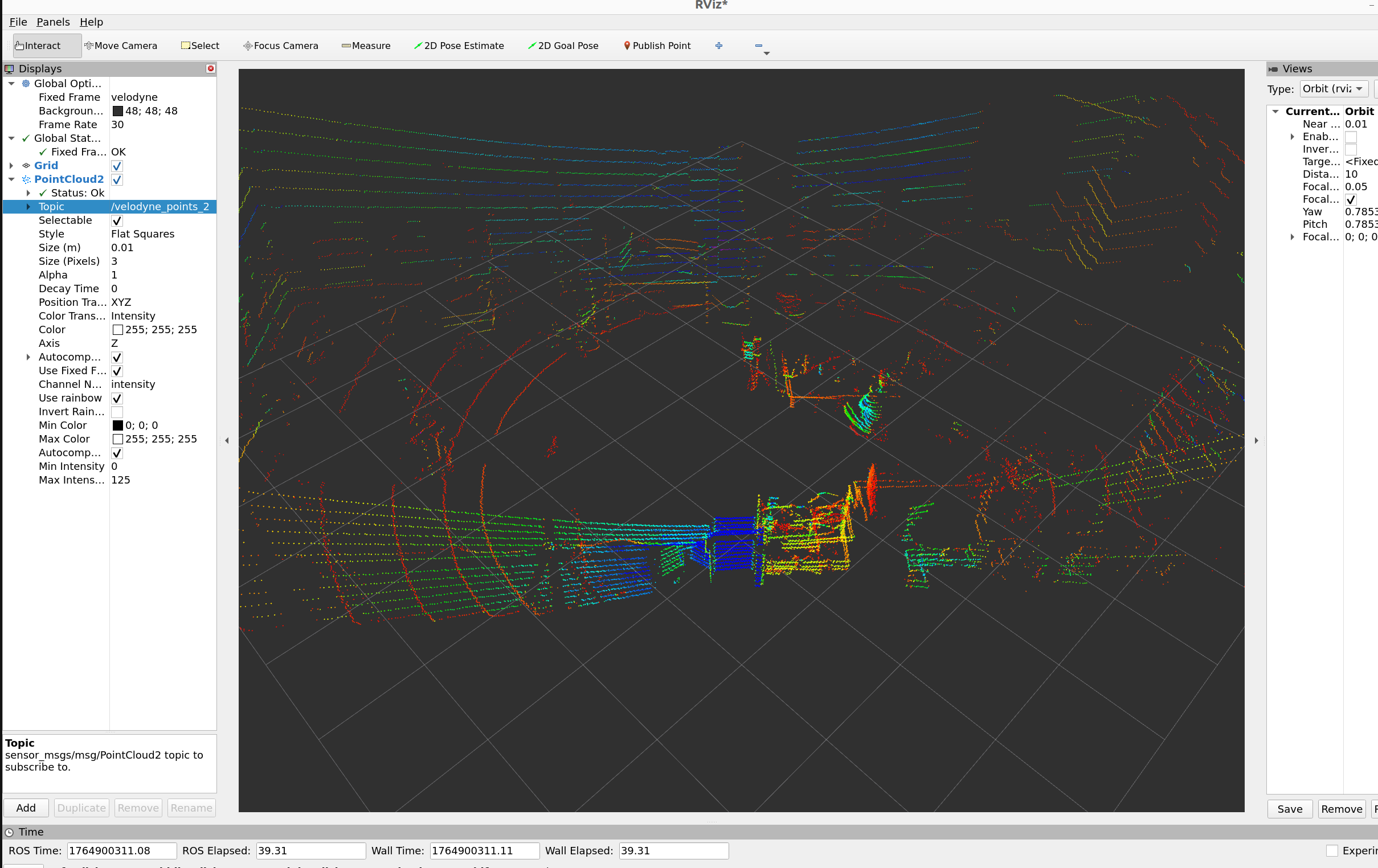
3.3 Visualize in RViz2
- Fixed Frame →
velodyne - Add:
- PointCloud2 →
/velodyne_points - Marker →
/bounding_box_edges - MarkerArray →
/lidar_bounding_boxes
4. Switching the LiDAR Model
Already supported via ROS params:
ros2 run mmdetect_lidar_demo mmdetect_lidar_demo \
  --ros-args \
  -p config_file:=/workspace/mmdetection3d/configs/second/...py \
  -p checkpoint_file:=/workspace/mmdetection3d/checkpoints/...pth
You may also use a params YAML or a launch file.
Supports: - PointPillars (default) - SECOND - CenterPoint - Part-A2 - PV-RCNN - Any MMDetection3D model
5. YOLO Image Demo (image_demo)
Included nodes:
| Node | Purpose |
|---|---|
video_publisher.py |
Publishes images from video |
video_yolo.py |
Runs YOLOv8 and publishes annotated frames |
image_relay.py |
Pass-through image relay |
image_filler_publisher.py |
Publishes placeholder image |
5.1 Run YOLO demo
ros2 launch image_demo yolo_demo.launch.py
5.2 RViz2 visualization
rviz2
 Add:
- Image →
/image_yolo
Or use:
rqt_image_view
6. Basic ROS 2 Demo (ros2demo)
Publisher:
ros2 run ros2demo ros2demo_publisher
Subscriber:
ros2 run ros2demo ros2demo_subscriber
Echo:
ros2 topic echo /topic
7. Running All Demos Together
Terminal 1 — YOLO:
ros2 launch image_demo yolo_demo.launch.py
Terminal 2 — LiDAR:
ros2 run mmdetect_lidar_demo mmdetect_lidar_demo
Terminal 3 — rosbag:
ros2 bag play your_lidar_bag
RViz:
rviz2
Add:
- /velodyne_points
- /bounding_box_edges
- /lidar_bounding_boxes
- /image_yolo
8. Summary
This container provides: - ✔ Real-time LiDAR 3D detection (MMDetection3D) - ✔ Real-time YOLOv8 image detection - ✔ A complete ROS 2 workspace - ✔ GPU-accelerated inference - ✔ Launch files and visualization pipelines - ✔ Dynamic model switching via ROS parameters
Perfect for robotics perception research, autonomy pipelines, or Jetson development.